Legion Workforce Engagement
- 4.7
- Rating
- 1.00M
- Installs
- Free
- Price

 Analysis by App-foxy
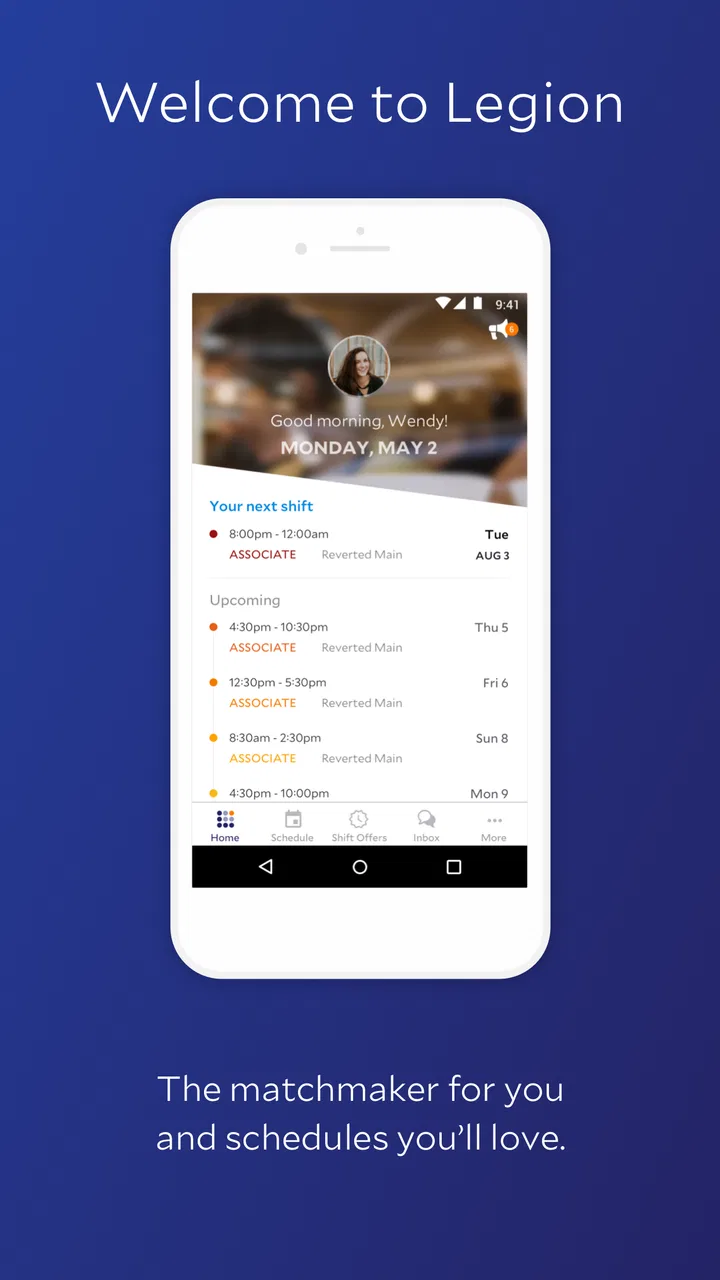
Legion Workforce Engagement is a business app built around the daily connection between a company and its frontline team. I found its value less in flashy presentation and more in the way a mobile phone can become the practical place where work information, availability, and team communication meet. That makes it especially relevant for people who are not sitting at a desk throughout the day.
The app is developed by Legion Technologies and is available free of charge for everyone. It belongs to the business category, has passed the one-million-install mark, and holds a 4.7 average from roughly fourteen thousand ratings. Those figures suggest that it has reached a substantial working audience, but they do not remove the need to consider how your workplace operates. A workforce app can be useful only when employees and managers actually use it consistently.
My overall impression is that this is best understood as a mobile companion for workforce engagement rather than a general-purpose chat tool or a simple calendar. It is designed to keep employees connected with the organization while they are moving between locations, shifts, and responsibilities. The experience depends heavily on timely access to the service, so connectivity is not a minor detail here; it shapes how reassuring or frustrating the app feels.
You May Also Like

 Blood Strike: 2.5 Anniversary
Blood Strike’s Loadouts Turn Every Drop Into a Tactical Gamble
A close look at Blood Strike’s custom loadouts: how fast access to signature weapons reshapes its battle royale rhythm, rewards preparation, and narrows the gap between fights.

 Pandora - Music & Podcasts
Pandora’s Music Is Easy to Start, but Harder to Recover
Pandora’s strength is its low-effort path from a seed to a station. Its weak spot is how much confidence it asks you to place in connection, setup, and quiet recovery.

 8 Ball Pool
 Is Built on Rivalries, Rematches, and Routine
A close look at the rivalries, rematches, shared routines, and unanswered safety questions that turn a quick pool match into a persistent mobile community.

 Samsung Music
’s Quiet Strength Is Playing What You Already Own
Its reach comes less from spectacle than from dependable access to a personal library. That simplicity is both the app’s strongest retention engine and its ceiling.

 AccuWeather: Weather Radar
AccuWeather Review: A Quick, Clear Forecast for Everyday Decisions
For everyday plans, the best forecast is the one you can understand quickly. AccuWeather makes rain timing, radar, and local conditions easy to act on, with a few trade-offs.

 Hill Climb Racing
Why Hill Climb Racing Still Turns Crashes Into One More Run
A tiny car, a bumpy hill and one more upgrade: Hill Climb Racing keeps resurfacing because its simple chaos makes every near-miss feel personal.
More From Our News Desk



How the app feels when work depends on a connection
I find connection quality matters most when a worker needs to act on current workplace information rather than simply browse at leisure. In this section, I look at how the app fits into a moving workday, what to do when access is unreliable, and why a simple backup routine can make mobile communication more dependable.
Network-dependent moments are where its value becomes clear
The most useful moments are the ones when a worker needs current information rather than something stored in an old email. A team member may open the app before heading to work, check what applies to the day ahead, or look for an update while away from a desk. In those situations, the phone is not merely a convenient screen. It becomes the employee’s direct route into the organization’s working rhythm.
That convenience also creates a clear trade-off. If the app needs to reach the service before it can show the latest workplace information, a weak signal can turn a quick check into a pause. I would not treat that as a flaw unique to this product; it is a natural consequence of using a connected workforce system. Still, it matters more here than it would in a static reference app because the usefulness of the information depends on it being current.
I recommend opening the app before leaving a reliable Wi-Fi area when you know you will be traveling to another site or working in a place with uncertain reception. This is a simple habit, but it reduces the chance of discovering a connection problem at the exact moment you need an update. It also helps you notice whether the app is responding normally before the workday becomes busy.
For managers, the network issue has another side. A message or change may be easy to create from a connected office, yet employees may encounter it later in a basement, warehouse, store room, or outdoor area. The app can improve reach, but a company should still avoid treating mobile delivery as a guarantee that every employee will see information instantly. Critical instructions need a communication plan that does not rely on a single screen.
Using it during a moving workday
The mobile format makes sense for frontline staff because it follows the person rather than tying information to a workstation. I can imagine using it while commuting, during a break, or between tasks, when opening a desktop portal would feel excessive. That lower barrier is one of the strongest reasons to choose a workforce-focused mobile app instead of asking employees to manage everything through a browser.
At the same time, a phone is not always the ideal device for detailed administrative work. Small screens encourage quick checks, but they are less comfortable for long reading, careful comparisons, or entering a large amount of information. If your role involves frequent planning or extensive management, I would expect a larger-screen workflow to remain more comfortable, even if the mobile app is useful for quick decisions and updates.
There is also a human factor. Employees may be comfortable with a phone but still need a clear boundary between work and personal time. A workforce app can make access easier, yet that same accessibility may encourage people to check work information outside their intended hours. The best experience depends on sensible workplace expectations, not just on the application itself.
One practical approach is to use the app for short, purposeful sessions. Check the information needed for the next work period, act on it, and close the app rather than repeatedly refreshing it throughout the day. This keeps the phone from becoming a constant distraction and makes connectivity work for the employee instead of demanding attention from them.
A realistic everyday scenario
Imagine a retail employee preparing for an early shift. Before leaving home, the employee opens Legion Workforce Engagement on a stable connection and checks the current work information. On the way to the store, reception becomes inconsistent. Instead of repeatedly trying to load the app in transit, the employee waits until reaching a reliable connection or the workplace network, then checks again for anything that may have changed.
That small routine illustrates both the strength and the limitation of the product. The app gives the employee a direct mobile channel, which is more practical than relying on a paper notice or an inbox that may not be checked. But the employee still has to think about when information was last retrieved and whether a new update might have appeared since then.
A manager could use the same pattern in reverse: prepare information while connected, publish it through the normal organizational process, and make sure urgent changes are also communicated through an appropriate backup route. The app can support the workflow, but it should not be mistaken for a substitute for good operational habits.
What happens when the connection fails?
Connectivity problems are most frustrating when the user does not know whether the issue is the phone, the local network, or the service itself. A workforce app should therefore be approached with a little patience. When a screen does not load, I would first check whether other online services are working, then move to a stronger connection before repeatedly tapping the same control.
This is especially important for employees who are under time pressure. Repeated attempts can waste a break or create uncertainty about whether an action was accepted. My advice is to avoid assuming that a delayed response means an action failed or succeeded. Wait for a clear result, then verify the status when the connection is stable. That habit is more dependable than relying on a quick tap and moving on.
Managers should prepare employees for this situation before it occurs. A short internal instruction can explain what to do when the app cannot connect, who to contact, and which communication method should be used for urgent matters. That is not a criticism of Legion Workforce Engagement; it is a realistic requirement for any connected business tool used across varied locations.
Recovery is also easier when information is not unnecessarily duplicated. If an employee receives one instruction in the app, another by text, and a third verbally, confusion can follow after a network interruption. A clear primary channel, supported by a simple backup process, makes it easier to determine which message is current once the connection returns.
Using mobile data without creating unnecessary friction
Because this is a mobile workforce product, some employees will use it away from Wi-Fi. I would not assume that every interaction consumes a large amount of data, but I would still encourage sensible habits. Avoid opening the app repeatedly just to see whether something has changed, especially when reception is poor. A weak signal can make a small task feel much longer while also encouraging unnecessary retries.
Employees with limited mobile data should pay attention to when they use the app most. Checking it on a trusted Wi-Fi connection before a shift can reduce dependence on cellular service. If workplace policy permits it, using the organization’s Wi-Fi may also make routine access more predictable, though the quality of that network will vary from one site to another.
There is a privacy consideration as well. A personal phone can make work access convenient, but employees should understand their organization’s expectations for device use and notifications. I would keep notification content as discreet as practical when the phone is shared with family members or visible in public. The app’s usefulness should not require an employee to expose workplace details on a lock screen.
For managers, data-conscious use means avoiding a flood of low-value updates. When every small change triggers attention, employees may start ignoring notifications, particularly when they are already managing a busy shift. The strongest mobile communication is selective: important enough to act on, clear enough to understand quickly, and timed for the people who need it.
Where it compares well with usual alternatives
The ordinary alternatives are familiar: paper notices, verbal briefings, email, text messages, and a browser-based employee portal. Paper is easy to place in a workplace but does not travel with the employee and can become outdated. Verbal communication feels immediate but is difficult to audit and easy to miss. Email works well for longer messages, yet frontline employees may not monitor an inbox during a shift.
A text message can be direct, but it is not always a good place to organize ongoing workplace information. It can mix personal and professional communication, become difficult to search, and encourage a manager to send separate messages manually. Legion Workforce Engagement has a more focused purpose: it gives the workforce a dedicated mobile point of contact instead of scattering work information across unrelated channels.
The comparison is less favorable when the main need is extensive document editing, complex reporting, or broad project collaboration. A conventional office platform may be better for those tasks because it is built around larger screens and deeper files. I would choose this app for mobile workforce connection, not as a replacement for every business system a company already uses.
Another trade-off is adoption. A paper notice requires no account setup or learning curve, while a mobile app asks employees to install, open, and understand a new tool. The benefit arrives only when the organization supports that transition clearly. If managers continue using several competing channels, the app may become one more place to check rather than the reliable home for workforce communication.
Who will benefit most, and who should skip it?
I see the strongest fit for organizations with employees who move around during the day, work in shifts, or do not have regular access to a desk. It is also a sensible option for people who want a more direct connection with their workplace than a noticeboard can provide. The free price and Everyone age rating remove two practical barriers for many teams, although the company’s own setup and policies will still determine the real experience.
Employees should expect the app to be most useful when their employer actively uses it. If the workplace rarely updates the system or continues to deliver every important message elsewhere, installing it may not change much. In that case, the problem is not necessarily the mobile interface; it is the lack of a shared communication routine.
I would also hesitate to recommend it as the only tool for a small team that already communicates effectively through a simple, agreed method. Adding a dedicated workforce app can introduce another login and another notification stream without enough benefit to justify the change. The right question is not whether the app has more functions than a text message, but whether the organization needs a structured mobile connection with its workforce.
Version, maturity, and the small details that matter
The app was released on February 22, 2017, and the current version is 3.6.3. It supports devices running operating system version 9 or later. That combination points to a product with several years of presence and a defined compatibility baseline, which is useful for organizations supporting a mixed collection of phones.
Even so, employees should check compatibility on the device they plan to use and keep the application maintained through the normal app-store process. A business tool can become unreliable when a phone is neglected, storage is nearly full, or the operating system is far behind. These are ordinary mobile maintenance issues, but they become more visible when the app is needed at a precise time.
The rating of 4.7 and the roughly three thousand eight hundred written reviews indicate a generally positive reception, while the wider rating count is around fourteen thousand. I treat that as encouraging rather than conclusive. Workforce apps are judged by the quality of the employer’s setup, the relevance of the information delivered, and the reliability of local connectivity, so one person’s smooth experience may not match another’s.
My connectivity verdict
Legion Workforce Engagement makes the most sense when a company wants to bring work communication closer to employees who are rarely seated at a computer. Its mobile-first role is practical, and I appreciate that it can reduce dependence on paper, scattered messages, and the assumption that every worker checks email throughout the day.
Its main weakness is also central to its design: the experience is tied to access at the moment information is needed. A poor signal, an overloaded workplace network, or unclear recovery instructions can turn a quick task into uncertainty. I would therefore judge the app together with the organization’s communication habits, not in isolation.
My recommendation is positive for shift-based and frontline teams that will use one clear mobile channel consistently. Before adopting it, managers should test the real locations where employees work, explain what to do when the connection is unreliable, and decide which messages truly deserve immediate attention. Employees should use stable connections when possible, verify important actions, and avoid treating the app as an all-purpose replacement for every business tool.
For that audience, this free business app from Legion Technologies can be a useful bridge between the organization and the people doing the work. The best result comes from pairing its mobile convenience with a dependable backup plan, so connectivity improves access without becoming a single point of failure.
FAQs for Legion Workforce Engagement
01What is Legion Workforce Engagement used for?
Legion Workforce Engagement is designed to streamline workforce management by providing tools for scheduling, communication, and labor optimization. It helps businesses manage their employees more efficiently through automated scheduling, real-time updates, and improved communication channels, ensuring both managers and employees are aligned and informed.
02Is Legion Workforce Engagement user-friendly for all employees?
Yes, Legion Workforce Engagement is designed with a user-friendly interface to accommodate users at all levels of technical proficiency. It offers intuitive navigation, clear instructions, and support resources, making it easy for employees to access schedules, request changes, and communicate with their teams effectively.
03What platforms is Legion Workforce Engagement available on?
Legion Workforce Engagement is available on both Android and iOS platforms. This ensures that users can access the app from a wide range of devices, whether it's a smartphone or tablet. The app is optimized for both operating systems, ensuring smooth performance and accessibility.
04How does Legion Workforce Engagement enhance communication within a team?
The app enhances team communication by offering real-time messaging features, notifications, and updates. Employees can easily communicate shift changes, availability, and other work-related information. This reduces misunderstandings and ensures everyone is on the same page, leading to better overall team coordination.
05Are there any costs associated with using Legion Workforce Engagement?
While initial downloads are typically free, there may be subscription fees or in-app purchases associated with the advanced features of Legion Workforce Engagement. Businesses should review the pricing details and consider any costs involved for premium functionalities to ensure it meets their budget and needs.
Pros
- User-friendly interface enhances navigation.
- Real-time scheduling updates improve efficiency.
- Customizable notifications keep users informed.
- Integration with popular payroll systems.
- Supports multi-location management seamlessly.
Cons
- Limited offline access could be inconvenient.
- Initial setup can be time-consuming.
- Some features require a learning curve.
- Occasional sync issues with external calendars.
- Advanced features locked behind paywall.

Legion Workforce Engagement
Gallery